
FBR digital invoicing software · Pakistan
Invoices that are BillKul right, filed with FBR in one click
BillKul is web-based sales and invoicing software for Pakistan. It submits each invoice to FBR’s Digital Invoicing API in real time, prints the FBR invoice number and QR code on the PDF, and works out sales tax, Further Tax and advance tax for you. [VERIFY: SRO/rule reference]
- Free FBR sandbox testing
- Your first 10 live FBR invoices free, no card needed
- Nothing to install
[PLACEHOLDER: trust strip]
Proof point to be confirmed
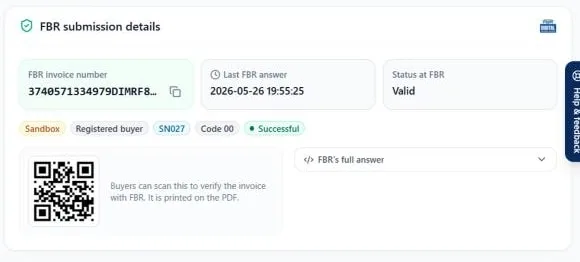
FBR number and QR
On every accepted invoice
Free sandbox testing
Sandbox invoices never count
Owner-only FBR tokens
Staff see only their work
Why BillKul
FBR digital invoicing without the double work
Without the right software
- Invoices typed twice: once in your books, once for FBR
- Rejections for a wrong HS code, unit, rate or buyer NTN
- Not sure which items need Further Tax or advance tax
- Unfiled invoices discovered at return time
- Excel sheets for stock and who owes what
With BillKul
- Save and submit: one click sends the invoice to FBR
- “Check with FBR” and a product FBR checklist catch problems first
- Sales tax, Further Tax and advance tax 236G/H worked out for you
- Daily tabs for FBR failed, unconfirmed and not filed
- Stock, receivables and the sales tax return in the same place
How it works
Live on FBR in three steps
Sign up and set up
Add your business, customers and products. The product FBR checklist shows what each item still needs.
Test in the FBR sandbox
Send test invoices with your sandbox token. They are free and never count against your plan.
Switch to production
One click. From then on every invoice goes to FBR and comes back with its FBR number and QR code.
Features
Everything you need to invoice, file and get paid
Save and submit to FBR in one click
Each invoice goes to FBR’s Digital Invoicing API (PRAL) in real time. FBR returns the invoice number, and BillKul prints it on your PDF. [VERIFY: SRO/rule reference]
FBR invoice number and QR code on every invoice
The FBR invoice number and QR code are printed on the invoice PDF. Your buyer scans the QR to check the invoice with FBR.
“Check with FBR” before you file
A dry run that checks the invoice against FBR’s rules without filing anything. Fix problems first, then submit.
Sales tax, Further Tax and advance tax worked out for you
Tax follows each product’s sale type, rate and SRO, and each buyer’s type and ATL status: standard rate, 3rd Schedule, reduced rate, Further Tax, §236G/§236H, FED and extra tax. [VERIFY: SRO/rule reference]
Fast invoice entry
Find clients by name, NTN, CNIC or phone. Add items by name, SKU or barcode. Use Quick add, saved item groups or “Repeat last invoice”.
Receivables you can see and chase
Ageing by Not due, 1–30, 31–60, 61–90 and 90+ days, client statements and one-click “Remind”. Record cash, bank, cheque, JazzCash or Easypaisa payments.
Stock and warehouses
Stock tracking, low-stock alerts, movement history, adjustments with reasons and physical counts, across shop, godown and branch with transfers.
Dashboard and business reports
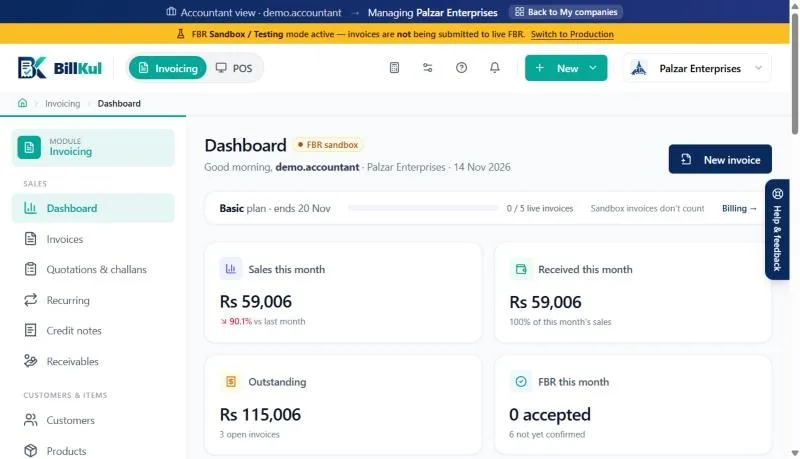
Sales, collections, outstanding and FBR status at a glance. Reports by client, item and profit, month, stock, purchases and advance tax 236G/H, with Excel export.
Rejection-proof workflow
Check with FBR → Submit → Accepted
Problems are caught before you file. If FBR still says no, “What FBR said” explains it in plain language and “Change to draft & fix” gets the invoice back in.
Dry run
1. Check with FBR
A dry run against FBR’s rules. Nothing is filed.
Sent to FBR
2. Save and submit
Sent to FBR’s Digital Invoicing API in real time. [VERIFY: SRO/rule reference]
FBR Accepted
3. Accepted, with QR
FBR invoice number and QR code printed on the PDF.
Timeout-safe: if FBR doesn’t reply in time, BillKul asks you to check IRIS before filing again, so nothing is filed twice.
Who it’s for
Built for how your business sells
Retailers
FBR invoices for walk-in and business customers, with stock that stays right.
- Walk-in and registered customers on one screen
- 3rd Schedule goods taxed on the retail price [VERIFY: SRO/rule reference]
- Barcode, Quick add and low-stock alerts
Distributors & Wholesalers
High-volume B2B invoices with Further Tax, 236G/H, challans and receivables.
- Further Tax and advance tax 236G/H by buyer [VERIFY: SRO/rule reference]
- Delivery challans: deliver first, bill later
- Receivables ageing and one-click reminders
Manufacturers & Importers
HS codes, units, package sizes, purchases and input tax kept right.
- HS code and FBR unit on every product
- Sell by carton, report units to FBR [VERIFY: SRO/rule reference]
- Purchase orders and supplier bills with input tax
Service Providers
Services invoices, recurring billing and receivables without stock complexity.
- Services invoice type
- Quotations that become invoices
- Recurring invoices for retainers
Accountants & Tax Firms
Manage many client companies from one login and pay from one firm wallet.
- “My companies” switcher, one login
- One firm wallet for every client
- Daily FBR clean-up per client
For accountants and tax firms
All your clients. One login. One wallet.
Accountant mode lets you switch between client companies with “My companies”, keep each one’s FBR invoicing clean every day, and export Annex-C and Annex-A for each return. One firm wallet pays for every client you manage.
Pricing
Simple plans, paid from your wallet
Test in the FBR sandbox for free: sandbox invoices never count against your plan.
Basic
For small businesses issuing their first FBR digital invoices
[PLACEHOLDER: Basic monthly price]
Standard
For growing retailers, distributors and service firms
[PLACEHOLDER: Standard monthly price]
Unlimited
For high-volume sellers and accounting firms
[PLACEHOLDER: Unlimited monthly price]
FAQ
Questions we hear every day
Who needs FBR digital invoicing?
FBR has made digital invoicing compulsory for certain categories of sales tax registered businesses under the Sales Tax Act, 1990. The categories and dates change, so confirm yours with your tax advisor or the latest FBR notification. [VERIFY: SRO/rule reference]
How does BillKul connect to FBR?
When you save and submit an invoice, BillKul sends it to FBR’s Digital Invoicing API (PRAL) in real time using your own FBR token. FBR returns an invoice number and BillKul prints it with a QR code on the invoice PDF. You don’t re-type anything into a portal. [VERIFY: SRO/rule reference]
What happens if FBR rejects an invoice?
BillKul shows “What FBR said” in plain language, for example a wrong HS code, unit of measure, rate or buyer detail. Click “Change to draft & fix”, correct it and submit again. To avoid rejections in the first place, run “Check with FBR” before you file.
How do I get started?
Sign up, add your business details, products and customers, then test in the FBR sandbox with your sandbox token. Clear the product FBR checklist and click “Switch to Production” when you are ready. [PLACEHOLDER: describe any setup help BillKul offers]
Ready to make FBR invoicing BillKul simple?
See BillKul on your own products in a live demo, or start a free trial and test in the FBR sandbox. Sandbox invoices never count against your plan.