
Service Providers
Invoicing for service providers: quotations, retainers and FBR in one place
BillKul is service invoice software for Pakistan. Agencies, consultants, contractors, IT firms and other service providers need clean invoices more than stock control. BillKul has a Services invoice type, quotations that convert into invoices, and recurring invoices for monthly retainers, all submitted to FBR in one click where digital invoicing applies to you. Receivables ageing, statements and reminders help you get paid on time. [VERIFY: SRO/rule reference]
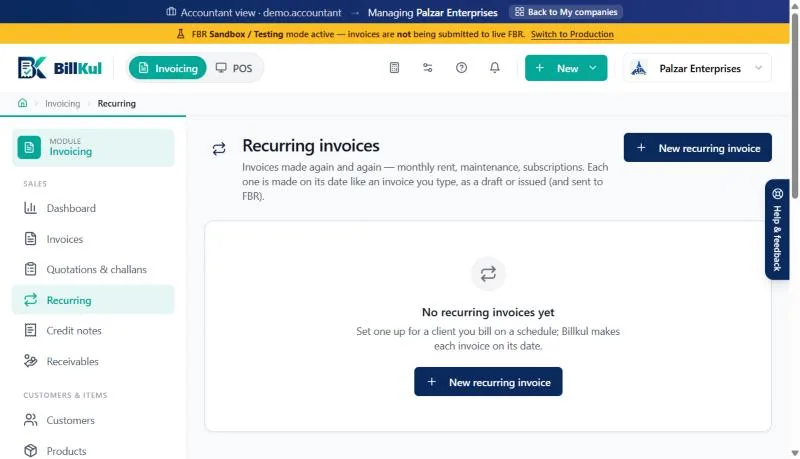
Real BillKul screen · demo data in the FBR sandbox
Sound familiar?
- Invoices made in Word or Excel, numbered by hand
- Retainers that someone forgets to bill
- Not sure which tax applies to which service
- Clients who pay late with no clear statement
How BillKul helps
Services invoice type
Built for services, with the FBR number and QR on the PDF.
Recurring invoices
Weekly, monthly, quarterly or yearly, as drafts or issued automatically.
Quotations
Convert an accepted quotation into an invoice in one step.
Get paid on time
Ageing, statements and one-click reminders.
Do service providers need FBR digital invoicing?
It depends on your registration and the services you provide. Sales tax on many services is collected by the provinces rather than FBR, while some service businesses fall under FBR’s rules. Check with your tax advisor which applies to you. BillKul submits invoices to FBR’s Digital Invoicing API when you need it, and still gives you professional invoices, quotations and receivables if you don’t. [VERIFY: SRO/rule reference]
Quotation, invoice, payment: one flow
- Send the client a quotation for the work, with your services, rates and tax.
- When they accept, convert it into a Services invoice. Nothing is typed twice.
- Save and submit to FBR where it applies; the FBR number and QR code print on the PDF. [VERIFY: SRO/rule reference]
- Email the PDF to the client from BillKul.
- Record the payment by bank transfer, cheque, cash, JazzCash or Easypaisa, and send a receipt.
Retainers that bill themselves
Monthly maintenance, support contracts, rent and subscriptions are easy to forget. Set the invoice to repeat weekly, monthly, quarterly or yearly. Choose drafts if you want to check each one first, or let BillKul issue them automatically and submit them to FBR on schedule.
Know who owes you
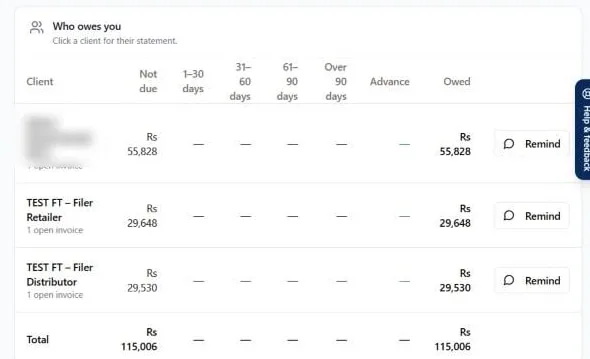
Service businesses live on cash flow. Receivables ageing groups unpaid invoices into Not due, 1–30, 31–60, 61–90 and 90+ days. Send a client statement or press “Remind”. Advances paid before the work starts are held on the client’s account and used against the next invoice.
Expenses and profit
Record expenses such as rent, travel and software under categories, with a photo of each receipt. Supplier bills with input tax feed the sales tax return helper where you are registered with FBR, and the profit summary shows what the business actually earned. [VERIFY: SRO/rule reference]
Works for
- IT, software and digital agencies
- Consultants and professional firms
- Contractors and maintenance companies
- Clinics, training centres and other service outlets [VERIFY: SRO/rule reference]
Word or Excel invoices vs BillKul
| Task | Word / Excel | BillKul |
|---|---|---|
| Invoice numbering | By hand | Automatic |
| FBR submission where required | Separately, if at all | One click, with FBR number and QR |
| Monthly retainers | Copy last month’s file | Recurring invoices |
| Who has paid | A separate sheet | Ageing, statements, reminders |
FAQ
Common questions
Is there an invoice type for services?
Yes. Choose the Services invoice type. Retailer and Distributor types are there too if you also sell goods.
Do I have to submit service invoices to FBR?
It depends on your registration and services. Many services are taxed by the provinces. Confirm with your tax advisor. [VERIFY: SRO/rule reference]
Can I bill a monthly retainer automatically?
Yes. Set a recurring invoice and choose whether BillKul creates drafts for review or issues it automatically.
Do I need to use the stock features?
No. Set up your services as products without stock tracking needs, and use invoicing, quotations and receivables on their own. [PLACEHOLDER: confirm non-stock (service) items are supported as described]
Can clients pay an advance?
Yes. Record it as a payment; with no invoice to match, it is held as an advance and used against the next invoice.
Explore other solutions
Accountants & Tax Firms
Manage many client companies from one login and pay from one firm wallet.
Learn moreDistributors & Wholesalers
High-volume B2B invoices with Further Tax, 236G/H, challans and receivables.
Learn moreManufacturers & Importers
HS codes, units, package sizes, purchases and input tax kept right.
Learn moreReady to make FBR invoicing BillKul simple?
See BillKul on your own products in a live demo, or start a free trial and test in the FBR sandbox. Sandbox invoices never count against your plan.