
Retailers
FBR digital invoicing for retailers, from walk-in sales to trade customers
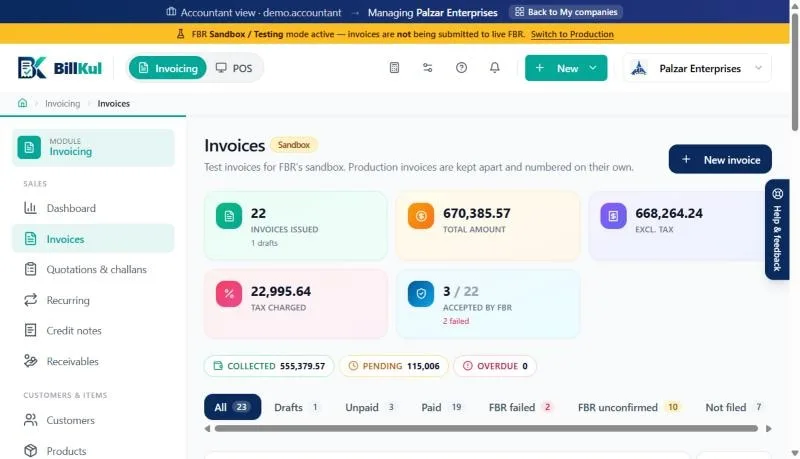
BillKul is invoicing software for retailers in Pakistan: one place to issue FBR digital invoices, keep stock and track who owes what. Choose the Retailer invoice type, pick a walk-in or registered customer, scan or search the items, and submit to FBR in one click. Tax is worked out for you, including 3rd Schedule goods taxed on the printed retail price. A POS till is coming soon; today BillKul issues every retail invoice from the normal invoice screen. [VERIFY: SRO/rule reference]
Sound familiar?
- Typing the same sale twice: once on the bill, once for FBR
- Not sure which items are taxed on the retail price
- Stock running out without warning
- Staff who can see more than they should
How BillKul helps
One click to FBR
Save and submit; the FBR number and QR code print on the PDF.
Retail-price tax done right
3rd Schedule items are taxed on the printed retail price. [VERIFY: SRO/rule reference]
Low-stock alerts
Know what to reorder for the shop and the godown.
Walk-in, unregistered and registered customers on one screen
Most retail sales go to walk-in customers, but some go to businesses that need their NTN on the invoice. In BillKul every customer has a tax profile: walk-in, unregistered or registered, with NTN or CNIC, STRN and province where needed. Search by name, NTN, CNIC or phone, or add a new customer without leaving the invoice. The right tax follows the customer automatically. [VERIFY: SRO/rule reference]
3rd Schedule goods: tax on the retail price
Many packaged goods sold in shops are in the 3rd Schedule, where sales tax is charged on the printed retail price rather than your selling price. Mark the product as 3rd Schedule once and BillKul calculates the tax on the retail price every time. Further Tax and advance tax are never added to these items. [VERIFY: SRO/rule reference]
Fast enough for a busy day
- Add items by barcode, name or SKU, or with Quick add.
- Saved item groups for products that sell together.
- “Repeat last invoice” for regular customers.
- Email the PDF invoice or payment receipt straight from BillKul.
- Record cash, bank transfer, cheque, JazzCash or Easypaisa payments against the invoice.
Stock for the shop, the godown and the next branch
Every invoice reduces stock in the warehouse it sells from. Set up the shop floor, the godown and any branch as separate warehouses, move goods between them, and get low-stock alerts before a best-seller runs out. A product FBR checklist keeps the HS code and unit of measure right on every item, so invoices are not rejected for set-up mistakes.
Staff accounts that only see their work
Give your billing and store staff their own logins. They can create invoices, receive payments and keep stock, while Settings, Billing and your FBR tokens stay with you as the owner.
Selling online too
If you sell through a website or marketplace as well as a shop, issue those invoices in BillKul in the same way, from the same stock. Whether online sales need FBR digital invoices depends on your category, so confirm it with your tax advisor. [VERIFY: SRO/rule reference] [PLACEHOLDER: confirm any eCommerce integrations before mentioning them]
Tier-1 retailers and POS
Some retailers, classed as Tier-1 under the sales tax rules, have their own point-of-sale integration requirements. A BillKul POS till is coming soon. Until then, BillKul is best suited to retailers who issue invoices from an invoice screen rather than a high-volume till. Join the POS waitlist to hear first. [VERIFY: SRO/rule reference]
Retail sales in BillKul
| Customer | What goes on the invoice | Extra tax |
|---|---|---|
| Walk-in | Walk-in customer, no NTN needed | By product and rules [VERIFY: SRO/rule reference] |
| Unregistered business | CNIC or NTN | Further Tax on standard-rate goods [VERIFY: SRO/rule reference] |
| Registered business | NTN, STRN and province | None beyond sales tax, unless advance tax applies [VERIFY: SRO/rule reference] |
FAQ
Common questions
Do retailers have to issue FBR digital invoices?
Some do, depending on their category and the notifications in force. Confirm your position with your tax advisor or the latest FBR notification. [VERIFY: SRO/rule reference]
Does BillKul have a POS till?
A POS till is coming soon. Today you issue retail invoices, including to walk-in customers, from the invoice screen. Join the waitlist on our FBR POS page.
How are 3rd Schedule items taxed?
On the printed retail price, not your selling price. BillKul does this automatically for products marked 3rd Schedule, and never adds Further Tax or advance tax to them. [VERIFY: SRO/rule reference]
Can I invoice a walk-in customer without an NTN?
Yes. Choose the walk-in customer and BillKul fills in what FBR expects for an unidentified buyer. [VERIFY: SRO/rule reference]
Can I use a barcode scanner?
BillKul lets you add invoice items by barcode, as well as by name or SKU. [PLACEHOLDER: confirm tested barcode scanners]
What do I need to start?
A computer with a web browser and internet, your NTN and STRN, your FBR sandbox and production tokens, and a list of your products. Invoices are PDFs, so any printer works.
Explore other solutions
Accountants & Tax Firms
Manage many client companies from one login and pay from one firm wallet.
Learn moreDistributors & Wholesalers
High-volume B2B invoices with Further Tax, 236G/H, challans and receivables.
Learn moreManufacturers & Importers
HS codes, units, package sizes, purchases and input tax kept right.
Learn moreReady to make FBR invoicing BillKul simple?
See BillKul on your own products in a live demo, or start a free trial and test in the FBR sandbox. Sandbox invoices never count against your plan.