
FBR invoice QR code
The FBR invoice QR code, explained and printed for you
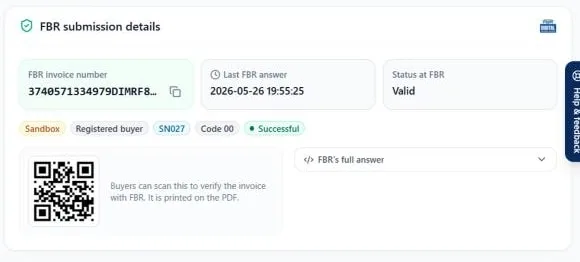
When FBR accepts a digital invoice, it returns a unique FBR invoice number. The QR code printed next to it lets anyone with a phone scan the invoice and check it against FBR’s records. BillKul prints both on the invoice PDF automatically as soon as FBR accepts the invoice, so your buyer can verify it and you never have to copy a number by hand. [VERIFY: SRO/rule reference]
Scan to verify
Buyers check the invoice with their phone. [VERIFY: SRO/rule reference]
Only after acceptance
The number and QR appear once FBR accepts.
On the PDF
Print on any printer or email it.
Timeout-safe
Unconfirmed invoices are checked in IRIS first.
What is the QR code on an FBR invoice?
It is a machine-readable link to the invoice record held by FBR, printed alongside the FBR invoice number. Its exact content, size and placement are set by FBR, which is why it should come from your invoicing software rather than being made by hand. [VERIFY: SRO/rule reference]
How the QR code gets on your invoice
- You click “Save and submit” in BillKul.
- The invoice goes to FBR’s Digital Invoicing API in real time.
- FBR accepts it and returns the FBR invoice number.
- BillKul prints the number and QR code on the invoice PDF and marks it “FBR Accepted”.
How a buyer verifies an invoice
The buyer scans the QR code with a phone and checks the details against FBR’s record. If the invoice was never accepted by FBR, there is no valid FBR number or QR to scan. [VERIFY: SRO/rule reference] [PLACEHOLDER: name the official FBR app or page buyers use to verify]
No QR code yet? Check the FBR status
An invoice gets its QR code only once FBR accepts it. In BillKul, an invoice without one will be Not filed, Sent/Unconfirmed or Failed. Not filed: submit it. Unconfirmed: check IRIS before filing again. Failed: read “What FBR said”, then “Change to draft & fix”.
FAQ
Common questions
Is the QR code required on FBR digital invoices?
For businesses under FBR digital invoicing, the invoice is expected to show the FBR invoice number and QR code. Confirm the current requirement with your tax advisor. [VERIFY: SRO/rule reference]
Can I make the QR code myself?
No. It must link to an invoice FBR has accepted, so it comes from the FBR submission. BillKul adds it automatically. [VERIFY: SRO/rule reference]
Why doesn’t my invoice have a QR code?
Because FBR has not accepted it yet. Check its FBR status: Not filed, Unconfirmed or Failed, and follow the steps for each.
Does the QR code work on a printed invoice?
Yes. The QR code is part of the invoice PDF, so it works printed or on screen. Print clearly so it scans.
What is the FBR invoice number?
A unique number FBR returns when it accepts an invoice. It is separate from your own invoice number, and both appear on the PDF. [VERIFY: SRO/rule reference]
Ready to make FBR invoicing BillKul simple?
See BillKul on your own products in a live demo, or start a free trial and test in the FBR sandbox. Sandbox invoices never count against your plan.