
Sales tax invoice software
Sales tax invoice software that gets every field right
A sales tax invoice in Pakistan carries more than a total: your NTN and STRN, the buyer’s details, each item’s HS code, quantity and unit, the value of supplies, sales tax and any further or advance tax. BillKul fills these in from your product and customer records, checks them against FBR’s rules, and submits the invoice to FBR so it carries the FBR invoice number and QR code. Some people call it “bill banane wala software”; we call it invoices that are BillKul right. [VERIFY: SRO/rule reference]
Tax lines done for you
Sales tax, Further Tax, 236G/H, FED and extra tax per item. [VERIFY: SRO/rule reference]
Credit and debit notes
Corrections linked to the original invoice.
FBR number and QR
Printed on the PDF once FBR accepts it.
What goes on a sales tax invoice?
The exact fields depend on your registration, the buyer and the goods, so confirm them with your tax advisor. A typical FBR sales tax invoice includes: [VERIFY: SRO/rule reference]
- Your business name, address, NTN and STRN.
- The buyer’s name and, for registered buyers, their NTN or CNIC, STRN and province.
- Invoice number, date and invoice type.
- For each item: description, HS code, quantity, unit of measure, value excluding tax, rate, sales tax and any further, advance or extra tax.
- Totals, plus the FBR invoice number and QR code once FBR accepts the invoice.
How BillKul fills it in
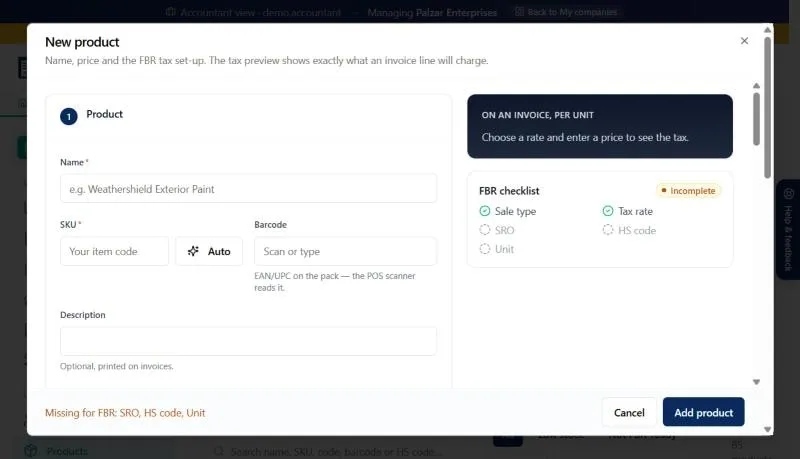
You choose the customer and the items; BillKul does the rest. The customer’s tax profile decides whether they are registered, unregistered or walk-in, and whether Further Tax or advance tax applies. Each product brings its HS code, unit, sale type, rate and SRO. “Check with FBR” runs a dry run before you file, and “Save and submit” sends the invoice to FBR in real time. [VERIFY: SRO/rule reference]
Moving from Excel or Word
- Add your business and tax details.
- Import customers in bulk and add your products, with HS code search for each one.
- Clear the “Not FBR-ready” counter so every product is complete.
- Test a few invoices in the FBR sandbox; they don’t count against your plan.
- Switch to production and issue your first live invoice.
Corrections the compliant way
Once FBR accepts an invoice it is locked, so you never edit it after the fact. Raise a credit note for returns or over-charges and a debit note for under-charges, each linked to the original invoice. [VERIFY: SRO/rule reference]
Spreadsheet invoice vs BillKul
| Field | Excel / Word | BillKul |
|---|---|---|
| Buyer NTN / STRN | Typed each time | From the customer profile, checked with FBR |
| HS code and unit | Looked up or left out | Stored on the product |
| Tax lines | Formulas that break | Calculated by product and buyer |
| FBR number and QR | Not possible | Printed after FBR accepts |
FAQ
Common questions
What is the difference between a sales tax invoice and an ordinary bill?
A sales tax invoice carries the registration details and tax breakdown required under the sales tax rules, and, where digital invoicing applies, the FBR invoice number and QR code. [VERIFY: SRO/rule reference]
Can I invoice unregistered buyers?
Yes. BillKul applies Further Tax on standard-rate goods for unregistered buyers automatically. [VERIFY: SRO/rule reference]
Is there “bill banane wala software” in Urdu?
This website is available in Urdu. The BillKul app itself is in English. [PLACEHOLDER: confirm app languages]
How do I correct a sales tax invoice?
If FBR has accepted it, issue a credit or debit note linked to it. If FBR rejected it, change it back to draft, fix it and resubmit. [VERIFY: SRO/rule reference]
Can I export my invoices for the sales tax return?
Yes. The sales tax return helper exports Annex-C (sales) and Annex-A (purchases) as CSV files for IRIS. [VERIFY: SRO/rule reference]
Ready to make FBR invoicing BillKul simple?
See BillKul on your own products in a live demo, or start a free trial and test in the FBR sandbox. Sandbox invoices never count against your plan.