
Features
Automatic sales tax, Further Tax and advance tax on every invoice
BillKul does automatic sales tax calculation on every invoice line for you. Sales tax follows the product’s sale type, rate and SRO. Further Tax is added for unregistered buyers on standard-rate goods. Advance tax under §236G or §236H follows the buyer’s type and active-taxpayer (ATL) status. FED and extra tax come from the product. You see the result before you save, and the same figures go to FBR. [VERIFY: SRO/rule reference]
Reviewed by [PLACEHOLDER: tax practitioner name, credentials]
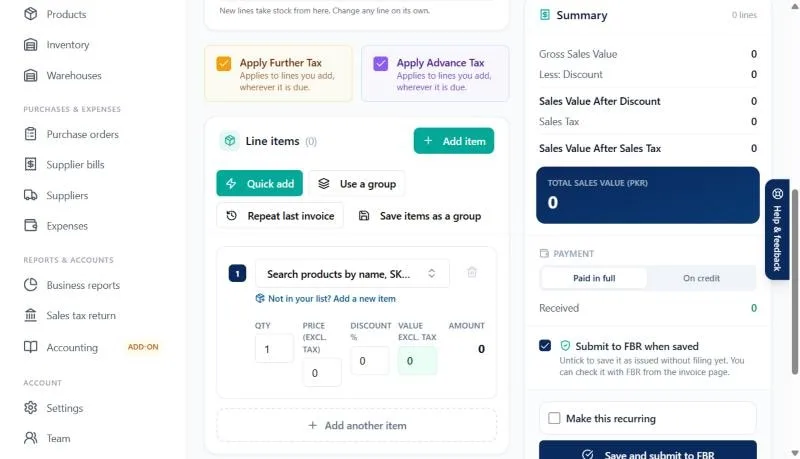
Sales tax by sale type, rate and SRO
Each product carries its own tax set-up, so the person typing the invoice never has to remember a rate. BillKul is aligned with the latest FBR SROs [PLACEHOLDER: list SRO numbers to cite] and supports these sale types: [VERIFY: SRO/rule reference]
- Standard-rate goods, taxed on the sale value.
- 3rd Schedule goods, taxed on the printed retail price (FRP-based), not the sale value.
- Reduced-rate goods, at the rate the relevant schedule or SRO allows.
- SRO goods, where a specific SRO sets the treatment.
- Exempt and zero-rated items are recorded as such, with no sales tax charged.
Further Tax for unregistered buyers
When you sell standard-rate goods to a buyer who is not registered for sales tax, Further Tax is added on top of sales tax. BillKul reads the buyer’s profile and adds it automatically. Further Tax is never applied to 3rd Schedule, reduced-rate, exempt or zero-rated items, and you can switch it off on a single invoice when it does not apply. [VERIFY: SRO/rule reference]
Advance tax under §236G and §236H
Sales to distributors, dealers, wholesalers and retailers can attract advance income tax collected by the seller. The rate depends on the buyer’s type and whether they are on the Active Taxpayers List (filer or non-filer). Set the customer type and ATL status once on the customer profile, and BillKul applies the right advance tax on every invoice to that customer. Like Further Tax, it can be switched off per invoice and is never applied to 3rd Schedule, reduced-rate, exempt or zero-rated items. [VERIFY: SRO/rule reference]
FED and extra tax, per product
Some goods carry Federal Excise Duty or an extra tax on top of sales tax. Add them to the product once and they appear on every invoice line for that product, in the right column, without anyone typing them. [VERIFY: SRO/rule reference]
See the tax before you save
When you add a customer or a product, BillKul shows a live tax preview: what a sample invoice line would carry for this buyer or this item. Mistakes in set-up show up straight away, not weeks later on a rejected invoice or a wrong return.
Why automatic tax matters for FBR filing
- Fewer rejections: the rate, SRO and sale type sent to FBR come from a checked product set-up.
- Consistent invoices: every cashier and salesperson charges the same tax for the same item and buyer.
- A cleaner return: output tax and advance tax 236G/H reports add up from the same invoice data.
- Less to remember: when a rate changes, update the product once instead of retraining staff. [VERIFY: SRO/rule reference]
Which extra taxes BillKul applies, by item type
| Item type | Further Tax (unregistered buyer) | Advance tax 236G/H |
|---|---|---|
| Standard rate | Yes, unless switched off on the invoice [VERIFY: SRO/rule reference] | By buyer type and ATL status [VERIFY: SRO/rule reference] |
| 3rd Schedule (retail price) | Never | Never |
| Reduced rate | Never | Never |
| Exempt / zero-rated | Never | Never |
What’s included
Sales tax, Further Tax and advance tax worked out for you
Tax follows each product’s sale type, rate and SRO, and each buyer’s type and ATL status: standard rate, 3rd Schedule, reduced rate, Further Tax, §236G/§236H, FED and extra tax. [VERIFY: SRO/rule reference]
FAQ
Common questions
Who pays Further Tax?
It is charged by the seller on supplies of standard-rate goods to buyers who are not registered for sales tax, in addition to sales tax. Check the current rate and exceptions with your tax advisor. [VERIFY: SRO/rule reference]
What is the difference between 236G and 236H?
Both are advance income tax collected at the time of sale. §236G broadly covers sales to distributors, dealers and wholesalers, and §236H covers sales to retailers. Rates differ for filers and non-filers. [VERIFY: SRO/rule reference]
How does BillKul know if a buyer is a filer?
You set the buyer’s ATL (filer) status on their customer profile, and BillKul uses it for advance tax. Keep it up to date when the buyer’s status changes. [PLACEHOLDER: confirm whether BillKul can look up ATL status automatically]
Is tax calculated on the retail price for 3rd Schedule goods?
Yes. For 3rd Schedule items BillKul calculates sales tax on the printed retail price (FRP), not on your sale price. [VERIFY: SRO/rule reference]
Can I turn off Further Tax or advance tax on one invoice?
Yes. Both can be switched off per invoice when they do not apply. They are never applied to 3rd Schedule, reduced-rate, exempt or zero-rated items anyway.
What happens when FBR changes a rate?
Update the rate or SRO on the affected products, and every new invoice uses it. [PLACEHOLDER: describe how BillKul updates rates after new SROs]
Ready to make FBR invoicing BillKul simple?
See BillKul on your own products in a live demo, or start a free trial and test in the FBR sandbox. Sandbox invoices never count against your plan.