
Features
Inventory and billing in one system, with every product FBR-ready
BillKul is inventory and billing software for Pakistan that keeps your stock and your invoices in the same place. Every sale reduces stock in the warehouse it ships from, every purchase adds to it, and you can see what is left in your shop, godown or branch at any time. Each product also carries its FBR details, such as sale type, rate, HS code and unit of measure, so the invoices you issue from that stock are accepted first time.
A product FBR checklist that prevents rejections
A common cause of FBR rejections is a product set up with the wrong HS code, unit or rate. In BillKul every product has a short FBR checklist: sale type, rate, SRO, HS code (with search, so you don’t need to know it by heart) and FBR unit of measure. A “Not FBR-ready” counter shows how many products still need attention, so you can fix them before they reach an invoice. [VERIFY: SRO/rule reference]
Prices, margins and package sizes
Enter any two of cost, margin and selling price and BillKul fills in the third. Give each product a barcode, a category and up to 8 pictures. If you sell by the box or carton, set a package size: you invoice one carton while FBR counts the units inside it, so your invoice matches FBR’s unit of measure. [VERIFY: SRO/rule reference]
Stock you can trust
- Stock levels update with every invoice, delivery challan and purchase receipt.
- Low-stock alerts tell you what to reorder before you run out.
- Full movement history shows where each unit came from and went.
- Stock adjustments are recorded with a reason, such as damage, expiry or a counting error.
- Physical stock count: count the shelf, enter the numbers and BillKul records the differences.
Shop, godown and branch: multiple warehouses
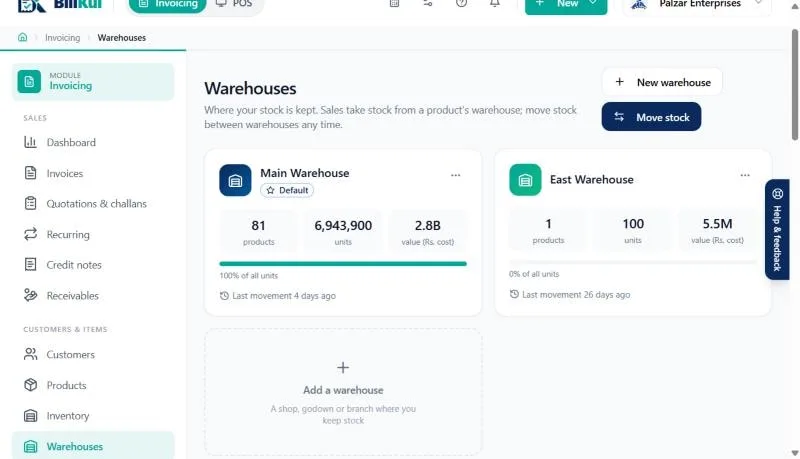
Set up a warehouse for every place you keep goods: the shop floor, the godown behind it, a second branch. Each one has its own stock. Move goods between them with a stock transfer, and choose the warehouse when you issue an invoice or a delivery challan, so stock comes off the right shelf.
Stock and profit reports
The stock report shows what you hold and where, and the by-item report shows sales and profit for each product. Both export to Excel for your accountant. Because stock, cost and sales live in one system, profit is worked out from real cost, not a guess.
Who it suits
- Retailers who need to know what is on the shelf and reorder on time.
- Distributors and wholesalers with a godown and delivery challans.
- Manufacturers and importers who sell by carton but must report units to FBR.
Spreadsheet stock vs BillKul
| Task | Excel or a register | BillKul |
|---|---|---|
| Reduce stock after a sale | Typed by hand, often later | Automatic from the invoice |
| Know when to reorder | When the shelf is empty | Low-stock alert |
| Stock in several places | One sheet per place | Warehouses with transfers |
| HS code and FBR unit on invoices | Looked up each time | Stored on the product |
What’s included
Stock and warehouses
Stock tracking, low-stock alerts, movement history, adjustments with reasons and physical counts, across shop, godown and branch with transfers.
Prices, margins and package sizes
Cost, margin and selling price fill each other in. Sell by box or carton while FBR counts the units inside. Barcode, categories and up to 8 pictures.
FAQ
Common questions
Can I keep stock in more than one location?
Yes. Create a warehouse for each shop, godown or branch and move stock between them with transfers.
Can I sell by carton but report units to FBR?
Yes. Set a package size on the product. You invoice by the box or carton and FBR receives the number of units inside. [VERIFY: SRO/rule reference]
How do I find a product’s HS code?
Use the HS code search on the product form. If you are unsure which code applies, confirm it with your tax advisor or customs agent. [VERIFY: SRO/rule reference]
What does “Not FBR-ready” mean?
The product is missing something FBR needs on an invoice, such as an HS code, unit of measure, rate or sale type. The counter shows how many products need fixing.
Does BillKul support barcodes?
Yes. Store a barcode on each product and add items to an invoice by barcode, as well as by name or SKU.
Can I do a physical stock count?
Yes. Enter what you counted and BillKul records the difference as an adjustment with a reason, keeping the history intact.
Ready to make FBR invoicing BillKul simple?
See BillKul on your own products in a live demo, or start a free trial and test in the FBR sandbox. Sandbox invoices never count against your plan.