
Features
Purchases and expenses that update your stock, costs and input tax
BillKul is purchase order and expense software for Pakistani businesses: it records what you buy as carefully as what you sell. Raise a purchase order, receive the goods in full or in part, and your stock and product cost update straight away. Enter the supplier’s bill with its input tax, and log everyday expenses with a photo of the receipt. Your purchases then flow into profit reports and the monthly sales tax return helper.
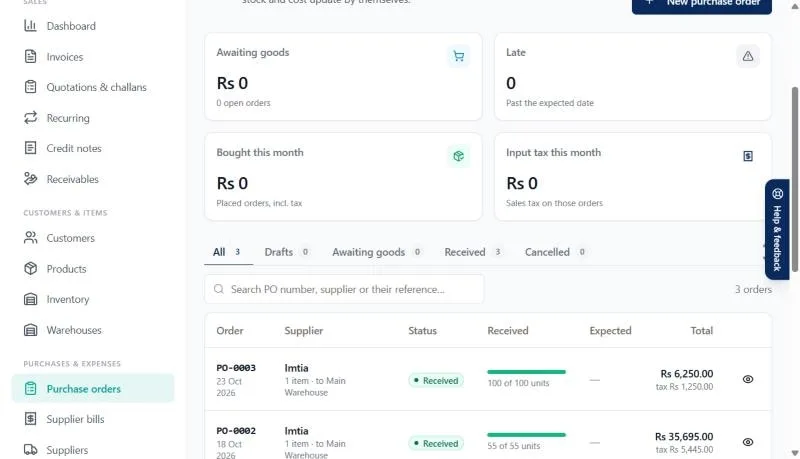
Purchase orders, received in full or in part
Suppliers rarely deliver everything at once. Raise a purchase order for what you need, then receive each delivery against it. A part delivery adds only what arrived to stock and keeps the rest of the order open, so you always know what is still on its way. Each receipt updates the product’s cost, which keeps your margins and profit reports honest.
Supplier bills with input tax
Record each supplier’s bill with the sales tax they charged you. That input tax is what you claim against the output tax on your own sales. BillKul totals it for the month and the sales tax return helper applies the 90% cap on input tax adjustment, so the estimated payable you see is closer to what you will actually file. [VERIFY: SRO/rule reference]
A supplier list you can rely on
Keep each supplier’s details in one place and see their purchase orders and bills together. The purchases report shows what you bought, from whom and when, and exports to Excel. When a supplier queries a payment or your accountant asks for a bill, you can find it in seconds instead of searching through files and WhatsApp messages.
Expenses with receipts and categories
Rent, electricity, fuel, salaries, repairs: record each expense under a category and upload a photo of the receipt. No more shoeboxes of paper slips at month-end, and your profit summary includes the costs of running the business, not just the cost of goods.
Who it helps most
- Distributors and wholesalers who buy in bulk and receive deliveries in parts.
- Manufacturers and importers who need accurate cost per unit to price their goods.
- Retailers who want to see stock rise the moment a supplier delivers.
- Accountants who need supplier bills and input tax in order before the return is filed.
How purchases connect to the rest of BillKul
- Raise a purchase order to the supplier.
- Receive goods in full or in part: stock goes up in the chosen warehouse and product cost is updated.
- Enter the supplier bill with its input tax.
- Sell the goods: invoices go to FBR and stock comes down.
- At month-end, the return helper sets input tax against output tax and shows the estimated payable. [VERIFY: SRO/rule reference]
Where each record shows up
| Record | Updates | Reports |
|---|---|---|
| Purchase order receipt | Stock and product cost | Stock, purchases |
| Supplier bill | Input tax for the month | Purchases, sales tax return helper |
| Expense | Costs by category | Profit summary |
What’s included
Purchase orders, supplier bills and expenses
Receive purchase orders in full or in part to update stock and cost. Record supplier bills with input tax, and expenses with receipt photos.
FAQ
Common questions
Can I receive part of a purchase order?
Yes. Receive only what arrived; stock and cost update for those items and the rest of the order stays open.
What is input tax?
Input tax is the sales tax you paid to registered suppliers on your purchases. Within the rules, it is adjusted against the output tax you charge on sales. [VERIFY: SRO/rule reference]
Why is input tax capped at 90%?
The sales tax rules limit how much input tax can be adjusted in a tax period, generally to 90% of output tax. BillKul applies this cap in its estimate. Confirm your position with your tax advisor. [VERIFY: SRO/rule reference]
Can I attach receipts to expenses?
Yes. Upload a photo or scan of the receipt with each expense, and file it under a category.
Do purchases change my product costs?
Yes. Receiving a purchase order updates the product’s cost, which feeds the cost / margin / selling price auto-fill and the by-item profit report.
Ready to make FBR invoicing BillKul simple?
See BillKul on your own products in a live demo, or start a free trial and test in the FBR sandbox. Sandbox invoices never count against your plan.