
Features
Receivables and payments: know who owes you, and collect it
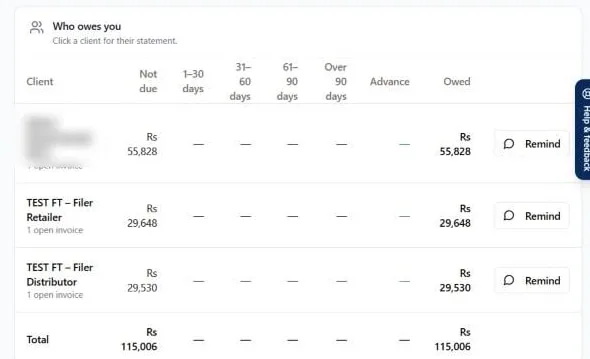
BillKul is receivables ageing software built into your invoicing: it tracks every unpaid invoice from the moment it is issued. The receivables ageing view sorts what you are owed into Not due, 1–30, 31–60, 61–90 and 90+ days, so you can see at a glance who to chase first. Send a client their statement or a one-click “Remind”, and record payments by cash, bank transfer, cheque, JazzCash, Easypaisa or other online methods.
Customer profiles that start with tax
Each customer record holds the details FBR and your accountant care about: NTN or CNIC, whether they are registered, unregistered or walk-in, STRN, province, customer type and ATL (filer) status. “Check with FBR” verifies their registration, and you can import existing customers in bulk. The same profile decides the tax on their invoices and keeps your receivables tidy.
Ageing that tells you who to call first
Money owed for 90 days is a different problem from money owed for 10. BillKul groups every open invoice by age so the oldest, riskiest balances stand out. Click a bucket to see the clients and invoices behind it, then act on them from the same screen.
Statements and one-click reminders
Clients pay faster when they can see exactly what is outstanding. Produce a client statement in seconds, or press “Remind” to send a reminder about overdue invoices. Overdue invoices also show a red “Overdue” payment badge in the invoice list, separate from their FBR status.
Record payments the way Pakistan pays
- Cash, bank transfer, cheque, JazzCash, Easypaisa and other online payments.
- Payments are applied to the oldest invoice first, automatically.
- Need a different split? Allocate a payment across invoices by hand.
- Money received with no invoice to match is held as an advance and used against the next invoice.
- Print or email a payment receipt as a PDF.
A collections routine that takes minutes
You don’t need a separate credit controller to stay on top of money owed. A simple weekly routine in BillKul is enough for most small and mid-sized businesses:
- Open receivables ageing and start with the 90+ and 61–90 day buckets.
- Send each of those clients their statement, or press “Remind” for overdue invoices.
- Record every payment received that week, so the oldest invoices close first.
- Check advances held for clients and use them against new invoices.
- Look at the invoiced-versus-received chart to see whether collections are keeping up with sales.
Collections on the dashboard
The dashboard puts sales, collections and outstanding side by side, with an invoiced-versus-received chart and your top clients. The by-client report exports to Excel when your accountant needs the detail.
How a payment is applied
| Situation | What BillKul does |
|---|---|
| Client pays less than they owe | Pays off the oldest invoices first; the rest stays open in ageing. |
| Client says which invoice they are paying | Use the manual split to allocate it exactly. |
| Client pays in advance | Holds it as an advance for the next invoice. |
What’s included
Customer tax profiles, checked with FBR
Store NTN/CNIC, STRN, province, customer type and ATL status. “Check with FBR” verifies registration. Import customers in bulk.
Receivables you can see and chase
Ageing by Not due, 1–30, 31–60, 61–90 and 90+ days, client statements and one-click “Remind”. Record cash, bank, cheque, JazzCash or Easypaisa payments.
FAQ
Common questions
What is receivables ageing?
It groups unpaid invoices by how long they have been outstanding: Not due, 1–30, 31–60, 61–90 and over 90 days. It shows which balances are at most risk.
Can I record JazzCash and Easypaisa payments?
Yes. Record payments as cash, bank transfer, cheque, JazzCash, Easypaisa or another online method. BillKul records the payment; it does not collect the money itself.
What happens to an overpayment?
Any amount not matched to an invoice is held as an advance on the client’s account and can be used against their next invoice.
How do reminders reach my client?
Press “Remind” on an overdue client. [PLACEHOLDER: confirm reminder channel – email, WhatsApp or SMS]
Does an unpaid invoice affect its FBR status?
No. Payment status and FBR status are separate. An invoice can be accepted by FBR and still be unpaid; BillKul shows both badges side by side.
Can I verify a customer’s NTN?
Yes. “Check with FBR” on the customer record verifies their registration before you invoice them.
Ready to make FBR invoicing BillKul simple?
See BillKul on your own products in a live demo, or start a free trial and test in the FBR sandbox. Sandbox invoices never count against your plan.